THE DIGITAL HUMAN PLATFORM

Your expertise.
New capacity.

The way your best people work,
made useful across your organization.

Expert work Your specialist Knowledge + actionInside your environment.
FOLLOW ONE EXCEPTION

From observed work
to usable intelligence.

One recorded scenario. A source conflict.
Watch the recorded response explain the next check, then explore the learning concept.

SOURCE-BACKED SCENARIO / CONCEPT INTERFACEInsurance intake Anonymized
01 / CAPTURE

The steps are visible. Capture the reason.

In the recorded Q&A, a valid intake condition conflicts with an Unknown form value. The answer starts with the intake source and the pending synchronization.

With consent, preserve the context, actions, corrections and outcome—inside your security boundary.

Capture Agent · buildingLearn from the judgment behind the click.
Expert workstationSource-backed scenario
CLAIM INTAKERecreated view

Two different signals.

Valid intakeSpecific conditionAuthoritative source
Claim formUnknownException to investigate
THE RECORDED ANSWERVerify the intake source.
THE TRACE PRESERVES
ContextDecisionOutcome
Consented observation

Concept interface based on the recorded Q&A. Participant controls and on-device privacy handling are product requirements.

02 / LEARN

Learn from your best. Keep the compliance floor.

Five people take 5, 6, 7, 20 and 22 minutes. The 12-minute average hides what distinguishes the best work.

Compliance first. Then weight for efficiency and accuracy. You hold the expertise dial; the compliance floor stays fixed.

Specialist training · demonstratedPreserve expertise without averaging it away.
Expert-weighted synthesisIllustrative task times
Compliance gateEvery example must pass first.
REQUIRED
Expert band · 5–7 minLonger task times
Compliance
Measured expertise
Specialist

Speed alone is not expertise. Weighting considers efficient, accurate and compliant work.

03 / IMPROVE

Try a better path. Keep what works.

Start with expert demonstrations. Explore a different approach, verify its outcome and keep it only when it passes the rules.

Recovery examples teach self-correction. A separate held-out evaluation tests whether the capability transfers to unseen work.

Illustrative learning mechanism · not a measured curveCompliance first. Verified improvement next.Explore the evaluations ↗
Learning from outcomesIllustrative mechanism
CAPABILITYLearn → explore → verify
Behavior cloningVerified-outcome learning

Dashed line: best observed demonstration.

01Try a variation
02Verify the outcome
03Keep or revise

Hard compliance constraints. Training feedback stays separate from the held-out test.

Expert workstationSource-backed scenario
CLAIM INTAKERecreated view

Two different signals.

Valid intakeSpecific conditionAuthoritative source
Claim formUnknownException to investigate
THE RECORDED ANSWERVerify the intake source.
THE TRACE PRESERVES
ContextDecisionOutcome
Consented observation

Concept interface based on the recorded Q&A. Participant controls and on-device privacy handling are product requirements.

PRODUCT CONCEPT · SCROLL TO FOLLOW THE LEARNING
04 / KNOWLEDGE, THEN ACTION

Ask with context.
Act with evidence.

The same learned judgment has two uses: help someone make a decision, then support a governed action.

A / ASK

A question in the middle of work.

Explore an answer from the recorded claims Q&A, alongside two rules from the documented workflow. Each response keeps its source and limits attached.

Knowledge demo · recordedExplore a separate execution demo ↓
Ask CompanionRecorded Q&A
WORKFLOW QUESTION

The intake summary says severe migraine headaches, but the claim form says Unknown. The linked absence and disability records are not yet synchronized. What comes next?

Digital Human

Verify the intake summary first. Use the valid source to reconcile the conflicting condition information, then confirm the linked records are synchronized before continuing to disability review.

Explains the source and the next check
Source and context Recorded Q&A
Recorded claims Q&A · Probe 1 · May 27, 2026

The response is adapted from the recorded explanation of source precedence and a workflow dependency. It does not show a record update or claim approval.

Company names and identifying details removed

Paraphrased from the recorded Q&A or documented workflow, as labeled. These are prepared responses, not a live chat.

B / OPERATE

The work, across applications.

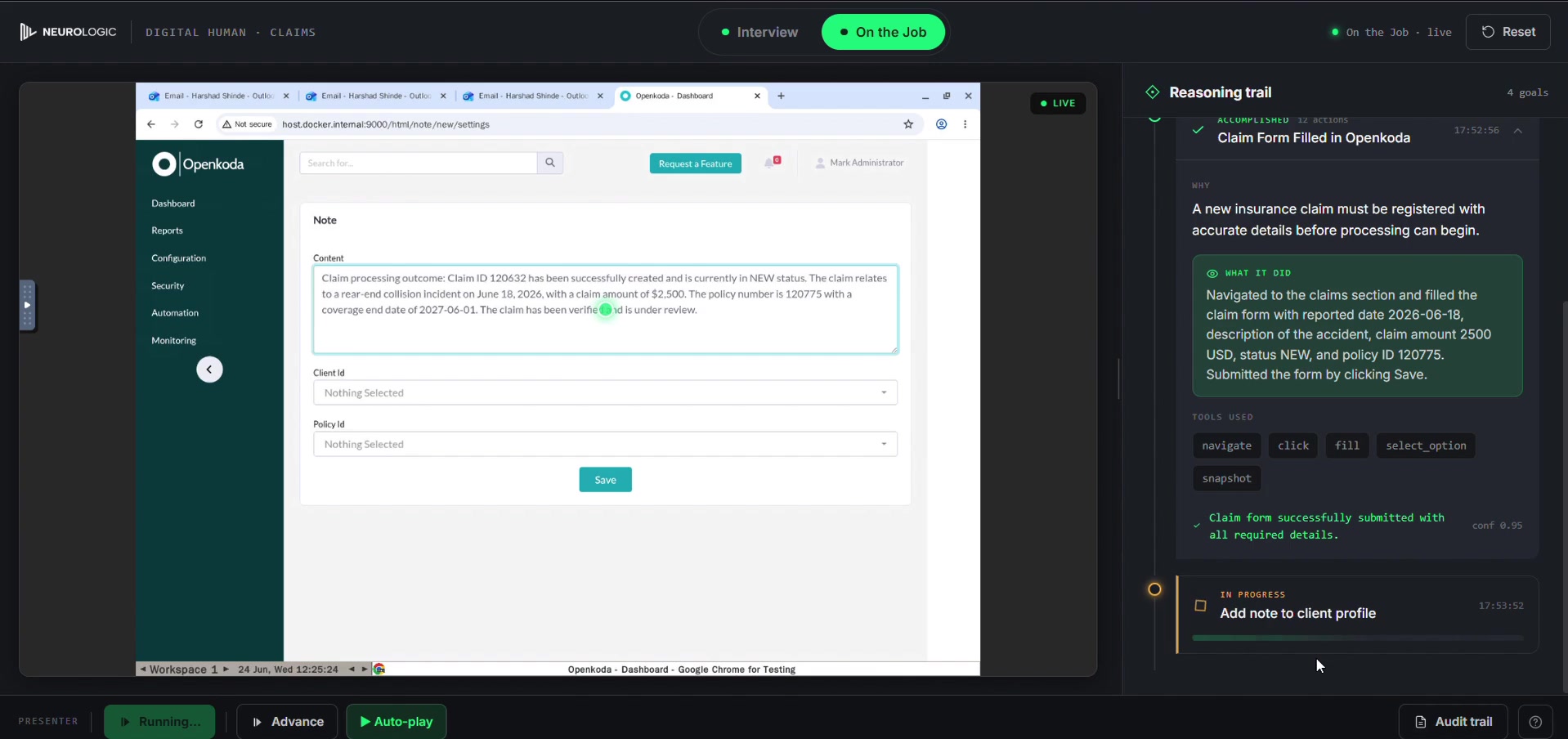
A separate motor-claims demo moves from incoming email to policy verification, claim registration, an added client note and a confirmation. Watch the actual application fill forms and carry the work forward.

Operator Console · in development

The silent highlights recording shows a completed demo sequence with synthetic data. The registered claim remains under review.

ACTUAL APP RECORDING00:55 / SILENT HIGHLIGHTS
01 / Verify coverage

The policy coverage is checked before the claim is registered.

A silent 54.5-second highlights cut using synthetic demo data. Selected sequences play at 2× speed; form recovery and the expanded reasoning have time to read. The full application and reasoning panel remain visible together. Pause or use the chapters to inspect a moment. The claim is registered and under review, not approved or paid.

Read the scene overview
  1. Verify coverage. The policy coverage is checked before the claim is registered.
  2. Fill the form. The application fills with claim details while the actual reasoning trail remains alongside it.
  3. Recover the amount. An edited amount is corrected back to 2,500. Watch the recovery and the remaining fields.
  4. Add a task. The registered claim appears with New status. A client-note task is added.
  5. Write the note. The client note and expanded reasoning show the work and its explanation in the same frame.
  6. Confirm the outcome. The reasoning records completion. The confirmation email keeps the claim in New status for review.
ONE INTELLIGENCE. FOUR WAYS TO WORK.

Different people.
One shared capability.

Follow the same work from the expert’s desk to the team, the operations leader and the reviewer.

01 / For the expertBuilding

Capture Agent

Make the judgment in everyday work teachable, with the participant in control.

Capability details
  • Visible capture status
  • Pause at any time
  • On-device privacy handling
  • No individual productivity scores
02 / For the teamPlanned

Ask Companion

Bring the answer and its evidence into the moment someone needs it.

Capability details
  • Observed-case citations
  • Read-only guidance
  • Clear abstention
  • Feedback for improvement
03 / For the operations leaderPlanned

Variance Map

See where the workflow differs, and where a better approach could help the team.

Capability details
  • Workflow-level patterns
  • Volume and variance together
  • Team coaching opportunities
  • Aggregate views, never individual rankings
04 / For operations and complianceIn development

Operator Console

Review the proposal, inspect the evidence, and decide what may act.

Capability details
  • Review and escalation queue
  • Per-workflow approval modes
  • Action and outcome records
  • Human oversight

Availability as of September 2026. Specialist-model training and bounded evaluations are demonstrated. Capture and execution are being productized; general customer-production autonomy is not yet available.

THE GRADUATION RULE

Give it responsibility.
As it earns your trust.

Every workflow starts with knowledge. Expansion depends on sustained, customer-validated evidence.

  1. 01

    Grounded knowledge

    Help a person decide.

  2. 02

    One bounded action

    Keep approval in the loop.

  3. 03

    Broader responsibility

    Expand only after validation.

Explore the autonomy controls ↗
PLANNED CAPABILITIES

Designed for the people responsible.

Review

Proposals, uncertainty and evidence in one queue. Availability will be agreed with design partners.

Inspect

Searchable decision history, exportable evidence and replay. Availability will be agreed with design partners.

Improve

Alerts for application changes, quality drift and recurring exceptions. Availability will be agreed with design partners.

START WITH ONE WORKFLOW

A clear path
to proof.

Agree the scope. Prepare access and examples. Target a 60-day pilot, with your held-out test deciding what comes next.

Explore your pilot
60days

PILOT TARGET

Readiness first.
Evidence before expansion.

A target after prerequisites are ready, not an automatic production date. Timing depends on readiness, complexity and validation.